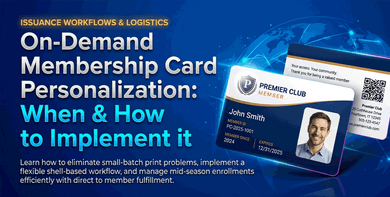
If your members join throughout the year, a single batch order creates a new problem every time someone signs up in the middle of the season. You either wait until enough names accumulate to justify a reorder, or you rush a small batch at a higher cost per card.
Most membership organizations do not operate on a single annual enrollment cycle. Members join at different times, renew on different schedules, and sometimes need replacement cards between planned orders. In that situation, the real question is not just how to print cards. It is whether your program needs a more flexible issuance workflow.
This article explains when on-demand personalization makes sense, how a shell-based workflow works in practice, and when direct-to-member fulfillment is worth adding.
When a Single Batch Order Stops Working
Standard batch printing works when your entire membership renews at once, and cards can be distributed in a single run. One data file, one shipment, done for the year.
The model breaks down when members join on their own schedule. You hold the order until 100 names accumulate, so new members wait weeks or months for a card. Your team matches printed cards to envelopes by hand, which takes time and creates room for errors. Since there is typically a minimum order quantity of 100 cards, if you only need 35, that leaves 65 unused, which is wasted budget and dead inventory.
If any of this sounds familiar, the standard batch model is no longer the right fit.
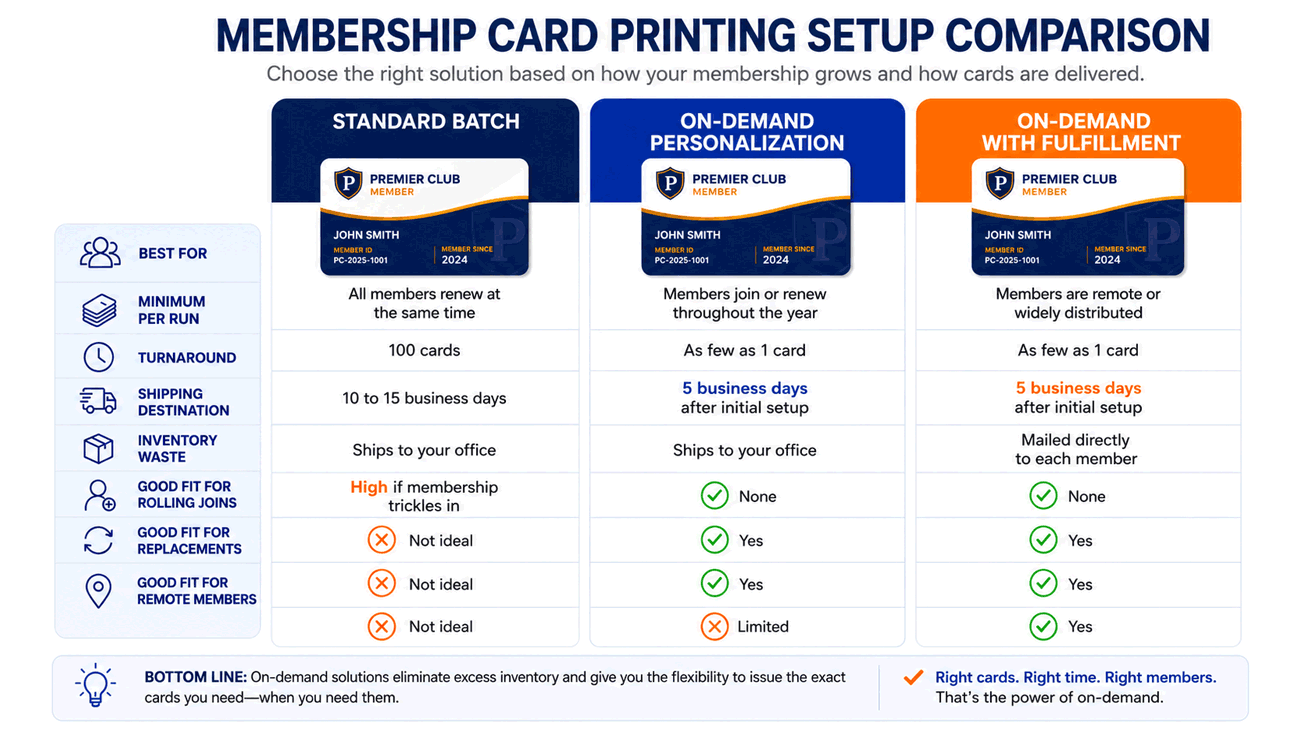
Which Setup Is Right for Your Organization?
Three options exist for membership card printing with personalization. The right one depends on how your membership grows and how cards get distributed.
Why Card Shells Make On-Demand Printing Possible
On-demand personalization works because the base card is printed in advance and stored before any member-specific details are added. That pre-printed base card is called a card shell.
Everything consistent across your membership is printed upfront: logo, background design, card type label, and back-of-card contact details. What stays blank is everything unique to each individual: name, member ID, expiration date, tier, and photo if your program uses one.
Shells are produced in a single run and stored at the print facility. The base printing is done and paid for. Personalization of each member's data is added as your program needs it. Simply send a new data file or push data automatically via Zapier.
Once on-demand personalization is complete, this can be taken a step further to create a complete solution using fulfillment services. With this option, each card can be adhered to a personalized letter via glue dot, inserted into an envelope, and mailed directly to the recipient as a complete welcome kit. Member kits can be tailored to include additional inserts or swag items as well.
How On-Demand Personalization Works
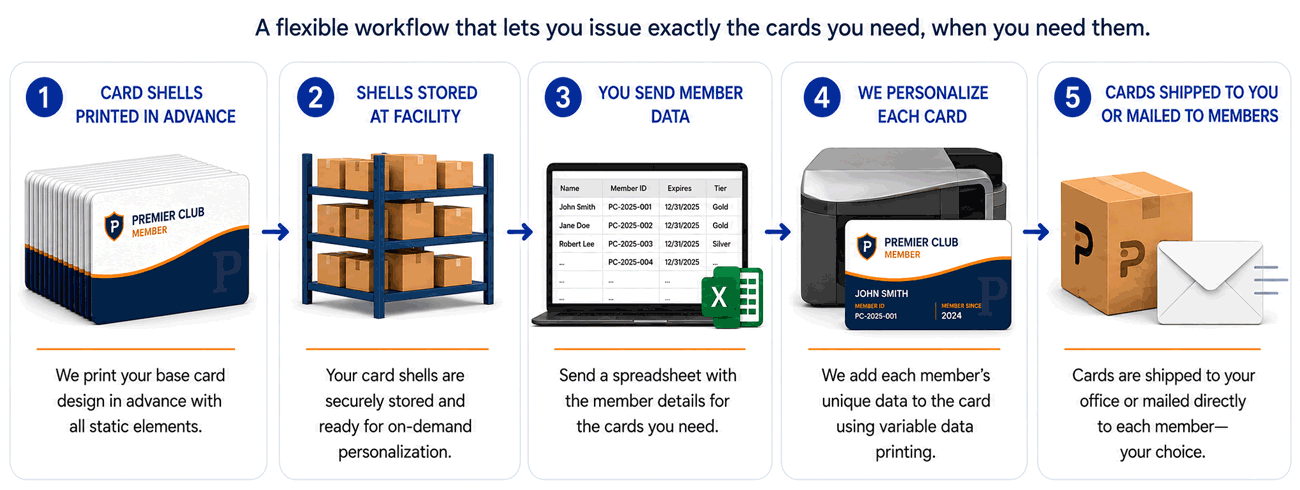
Once your shells are in storage, your team sends a spreadsheet with the member details to be printed. Each row represents one member, and each column represents one field such as name, member ID, expiration date, tier, barcode, QR code, or photo.
A variable data printing pass matches each row to one shell and prints only the cards needed for that run. That could be one card, fifty cards, or several hundred.
The initial shell order usually takes 10 to 15 business days. After setup, most personalization runs are completed and mailed out within a week.
New Joiners, Renewals, and Replacements
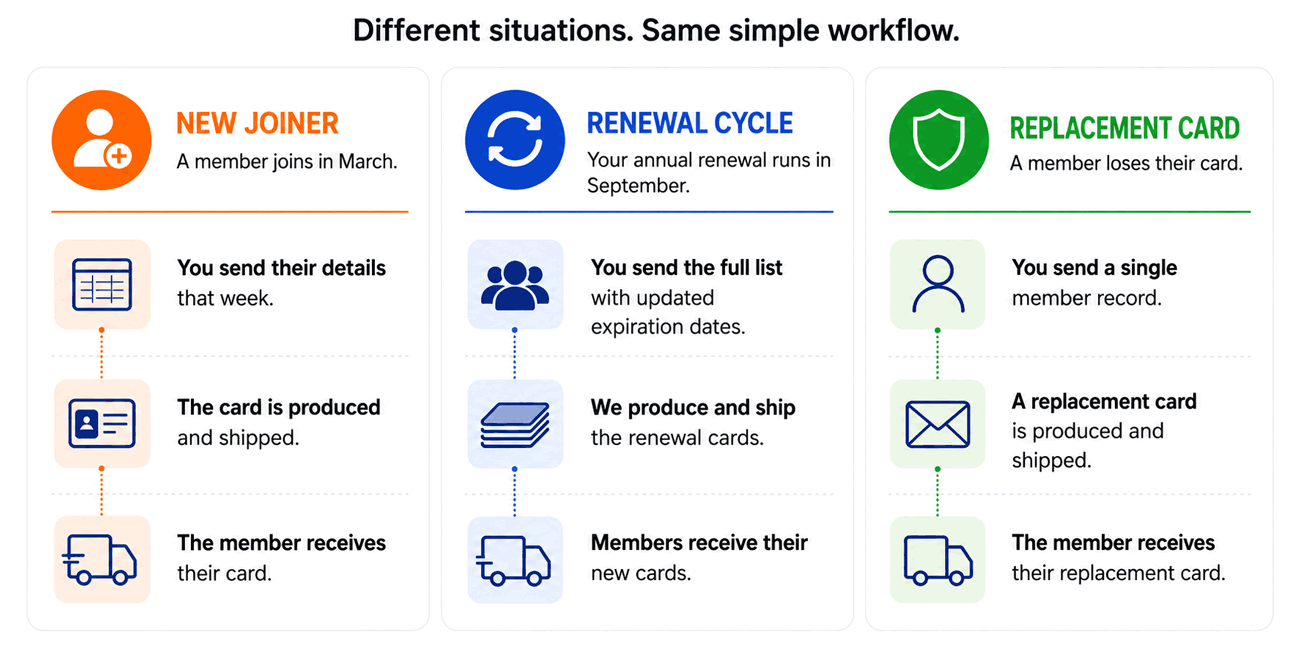
These are the 3 situations that send membership managers looking for cards outside a scheduled run. The shell program handles all 3 through the same process.
A new member joins in March. You send their details that week. The card is produced through the same workflow without waiting for a larger batch.
Your annual renewal cycle runs in September. You send the full list with updated expiration dates, whether that is 50 names or 500. Same process, larger draw from your shell inventory.
A member loses their card. You send a single name. A replacement card is produced without reopening a full print order.
These are different card issuance needs, but they all run through the same workflow. This level of consistency enables on-demand personalization to be a practical solution for membership programs that don't renew in a single annual cycle and must issue cards promptly.
When To Ship Cards To Your Office And When To Mail Them Directly
Once personalized, cards can either be shipped to your office for internal distribution or mailed directly to each member. The better option depends on how your organization already handles onboarding and renewals.
Shipping to your office makes sense when your team hands out cards at a front desk, distributes them during events, or adds them to welcome packs in-house. Direct mail fulfillment makes more sense when members are remote, spread across multiple locations, or are not easy to reach through a central office.
For organizations with remote members, national reach, or no practical way to distribute in person, fulfillment removes the internal logistics entirely.
On-demand personalization is usually the better fit when your program has staggered joins, rolling renewals, replacement needs, or members spread across different locations. If your entire membership renews at the same time and cards are handed out in one cycle, a standard batch order may still be the simpler option. Still not sure? Here’s another look at both membership card options.
How to Get Your Program Started
The first step is to estimate how many cards you are likely to issue over the next 6 to 9 months, including new joiners, renewals, and expected replacements. That estimate helps determine how many shells to produce upfront.
Next, finalize the card design and confirm which fields will need to be personalized later. Once the proof is approved, the shells are printed and stored for future runs.
After setup, your team only needs to send the data file whenever cards need to be issued. That is what turns the program into an ongoing workflow rather than a fresh order every time. It’s as simple as sending an email with your spreadsheet.
To get started or request pricing, call 800-547-6624, Monday through Friday, 8am to 5pm EST, or click here to request a membership card quote.
Frequently Asked Questions
What is a card shell in membership card printing?
A card shell is the pre-printed version of your card that holds the permanent design elements. Member specific details are personalized on-demand each time you submit a new data file.
What is the minimum number of card shells that can be purchased?
The minimum number of total card shells for your entire campaign is 100.
What is the minimum number of cards I can personalize at one time?
There is no minimum after the shell program is set up. You can personalize one card or many in the same workflow.
How is member information provided?
Each batch of membership information can be supplied on an Excel or csv file which can be submitted via email, secure FTP site, or pushed automatically using Zapier.
How long does on-demand membership card personalization take?
Shell production usually takes 10 to 15 business days at the start. After that, most personalization runs are completed in around 5 business days.
Can my membership cards be mailed directly to my members?
Yes. Direct mail fulfillment can attach each card to a matching letter, insert it into an envelope, and send it straight to the member.
What information can be personalized on each membership card?
Common fields include member name, member ID, expiration date, membership tier, barcode, QR code, and photo, depending on your program setup.