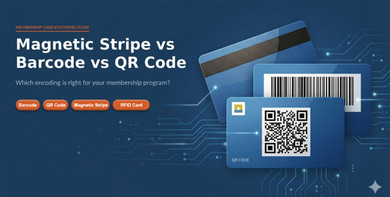
When I talk to organizations placing their first membership card order, the question that comes up more than any other is about encoding. Get it wrong and the cards work fine as printed pieces but do nothing at the point of check-in, because the encoding does not match the reader or software already in place.
This guide covers all three encoding options in the context of membership programs, with the history behind each technology, what it actually does at the card level, and a clear decision framework for matching the right encoding solution to your specific setup.
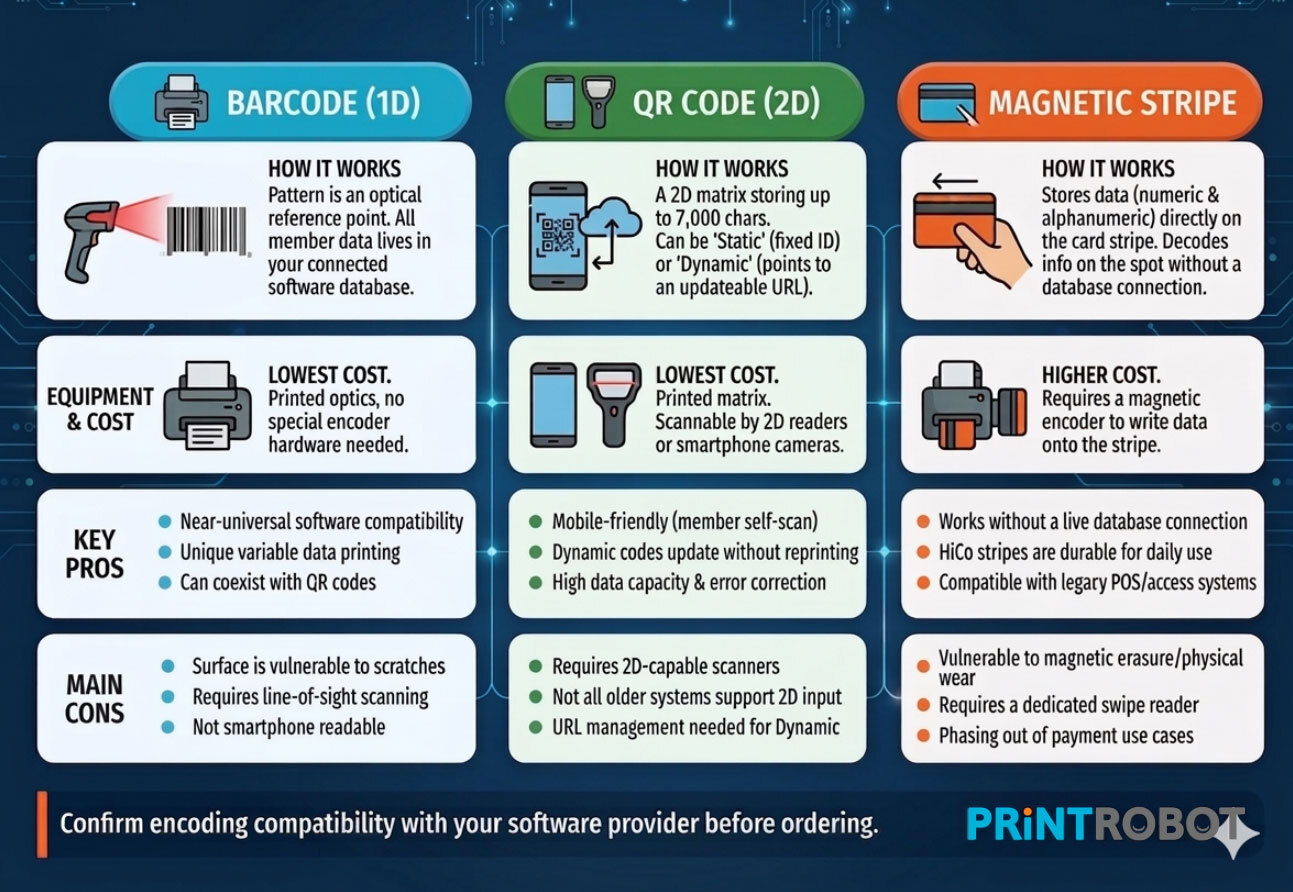
For an understanding of how different membership cards work in real programs, see the infographic below.
For most organizations, the decision becomes much clearer once the basics of how membership cards work in practice are already understood.
What Is the Difference Between a Barcode, QR Code, and a Magnetic Stripe?
A barcode stores no data on the card itself. It is a printed optical pattern that a scanner reads and converts into a number. The reader sends this number to a connected database to look up the member's record. The card is a reference point. All the member data lives in the software.
A magnetic stripe works differently. It stores data directly on the card in a thin layer of iron-based magnetic particles. When someone swipes the card through a reader, that data is decoded on the spot. The card carries the information with it rather than pointing to a database.
For most membership programs, that distinction has a practical consequence. With a barcode card, if the reader loses its database connection, it cannot verify membership. With a magnetic stripe card, the reader can decode the stored identifier without a live connection. In practice though, most membership software runs cloud-connected check-in systems where a dropped connection is the exception rather than the rule, which is one reason barcode cards work well for the vast majority of programs.
Cost difference: Printing a barcode requires no special hardware beyond a standard card printer. Encoding a magnetic stripe requires an encoder, a piece of equipment that writes the data magnetically onto the stripe. That additional step adds both equipment cost and a more involved production process.
Security: A barcode is visible on the card surface, which means the pattern can technically be photographed and reproduced. A magnetic stripe's data is invisible without a reader, making it harder to duplicate. For membership programs, this security gap rarely matters in practice. The risk of someone attempting to forge a gym membership card is low compared to, say, forging a credit card.
Barcode Membership Cards
A brief history
The barcode was invented by Norman Joseph Woodland and Bernard Silver, who filed their patent in 1949 and received it in 1952. Woodland, inspired by Morse code, sketched the first working concept in the sand on a Florida beach. The technology sat dormant commercially for over two decades until IBM engineer George Laurer developed the Universal Product Code (UPC) in 1973, and the first product was scanned at a Marsh supermarket in Troy, Ohio on June 26, 1974. That product was a pack of Wrigley's gum, priced at 67 cents.
By 1989, barcodes were used in more than half of all US grocery sales. Today the UPC provides for 100 billion possible combinations.
How barcode cards work for membership programs
A 1D barcode for membership use is typically encoded in Code 128 or Code 39. Code 128 is the more compact format and handles a wider character set, making it the standard choice for member ID numbers. Code 39 is slightly older and is still common in some industry-specific systems, including certain healthcare and government applications.
The card is held or swiped in front of a laser or CCD scanner at the check-in desk. The scanner reads the pattern, converts it to the member ID number, and passes it to the membership management software. The software looks up the record, confirms active membership, and logs the visit. The whole process takes about the same time as scanning a product at a supermarket checkout.
QR codes, which are technically a 2D barcode, are covered separately below because they work differently and suit a different set of use cases.
Pros
- Lowest cost encoding option. No encoder needed, works with any PVC card printer
- Compatible with virtually all membership management platforms and gym software
- Code 128 format handles alphanumeric member IDs of any reasonable length
- Barcode and QR code can coexist on the same card, giving members and staff two scanning options
- Variable data printing produces a unique barcode per member from a single data file
Cons
- Requires line of sight between the scanner and the barcode, so the card must be presented correctly
- The code is visible, which in theory allows duplication, though this is a low concern for membership programs
- Cannot be read by a magnetic swipe reader or RFID hardware
QR Code Membership Cards
A brief history
The QR code was invented in 1994 by Masahiro Hara, an engineer at Denso Wave in Japan. Denso was then a division of Toyota's component manufacturing business, and the problem they were solving was a practical one: standard barcodes could only encode around 20 alphanumeric characters, which was not enough to label automotive parts carrying complex production data. Hara's team, reportedly inspired by the grid of a Go board, developed a two-dimensional matrix code capable of encoding up to 7,000 characters and readable from any angle at high speed.
Denso Wave made the QR code specification publicly available and chose not to exercise its patent rights, which is why the format spread without licensing friction. By 2002, Japanese mobile phones included built-in QR readers. Global adoption accelerated sharply during the COVID-19 pandemic in 2020, when contactless interaction became a priority across retail, hospitality, and public facilities.
A 2012 report found 66% of merchants surveyed used QR codes on printed materials. By 2020, QR usage had increased significantly as contactless alternatives became essential across industries.
How QR code cards work for membership programs
A QR code on a membership card can function in two ways, and understanding the difference matters for how you order and manage the cards.
Static QR: When a static QR code is used, every card is printed with the exact same code, linking to the exact same URL. This is useful if linking to a website or video file.
Dynamic QR: Dynamic QR codes allow each card to be printed with a unique QR code. Basically variable data for QR codes. Each card links to a unique URL, often one that is tied to the member it is issued to in some way.
Unlike a 1D barcode, a QR code can be read by any smartphone camera without a dedicated scanner or app download. For programs where members self-scan at entry, where digital integration with a mobile app matters, or where the card needs to link to a web-based member portal, QR is the more flexible format.
Pros
- Scannable by any smartphone camera, no dedicated reader required at the facility
- Dynamic QR codes allow for a unique code to be added to each card
- Stores significantly more data than a 1D barcode
- Works with variable data printing to generate a unique code per member from a data file
Cons
- Requires a 2D capable scanner or smartphone. A standard 1D laser barcode scanner cannot read a QR code
- Some older membership management systems do not support QR scanning. Confirm compatibility before ordering
- Dynamic QR codes require a URL management service to handle the redirect layer
Magnetic Stripe Membership Cards
A brief history
The magnetic stripe card was invented by Forrest Parry, an IBM engineer, in 1960. He was working on a secure identity credential for CIA officials and trying to bond a strip of magnetic tape to a plastic card. Every adhesive he tried either warped the tape or damaged its magnetic properties. The solution came from his wife Dorothea, who was ironing clothes when he came home frustrated. She suggested using the heat of the iron to melt the stripe directly onto the card. It worked.
IBM standardized the format in 1969, and it became an international standard two years later. Through the 1980s and 1990s, magnetic stripe cards became the default credential for access control, employee ID programs, hotel room keys, and membership programs of all kinds. The technology was reliable, the readers were widely available, and the format was universally understood by card printers and system vendors.
Over time, most membership programs shifted away from magnetic stripes toward barcodes and RFID. The reasons were practical: barcode cards require no encoder, cost less to produce, and work with modern membership management software out of the box. Hotel key cards remain the primary active use case for magnetic stripes today, alongside some legacy gym and access systems installed before barcode readers became the standard.
A 2024 NACCU survey found that 95% of college and university card programs still include a magnetic stripe on their campus card, even where contactless technology has been adopted for most functions. It is a testament to how deeply embedded the format became in institutional infrastructure.
How magnetic stripe cards work for membership programs
The magnetic stripe on a membership card contains three data tracks. Track 1 stores alphanumeric data including name and account number (IATA standard). Track 2 stores numeric data such as a member ID number (ABA banking standard). Track 3 is rarely used in membership applications.
HiCo vs LoCo: High Coercivity (HiCo) stripes require a stronger magnetic field to encode and are more resistant to accidental erasure from everyday magnets. They are the right choice for long-life membership cards used daily. Low Coercivity (LoCo) stripes are cheaper to encode but easier to erase, which is why they are used in temporary or single-use cards like hotel room keys or gift cards rather than long-term membership credentials.
To issue magnetic stripe membership cards, you either need a plastic card encoder or you can provide the encoding specifications to your plastic card printer according to the requirements of your POS or access control system.
Pros
- Data stored on the card itself, not dependent on a live database connection to decode at the reader
- HiCo stripes are durable under daily use and resistant to most common magnetic interference
- Widely recognized format, compatible with many legacy POS and access control systems
- Can carry more character data than a 1D barcode
Cons
- Requires a dedicated swipe reader. A standard barcode scanner cannot read a magnetic stripe
- Not all membership management software supports magnetic stripe input. Compatibility must be confirmed before ordering
- Being phased out of payment applications; new membership setups increasingly prefer barcode or RFID
Is a QR Code Better Than Barcode for Membership Cards?
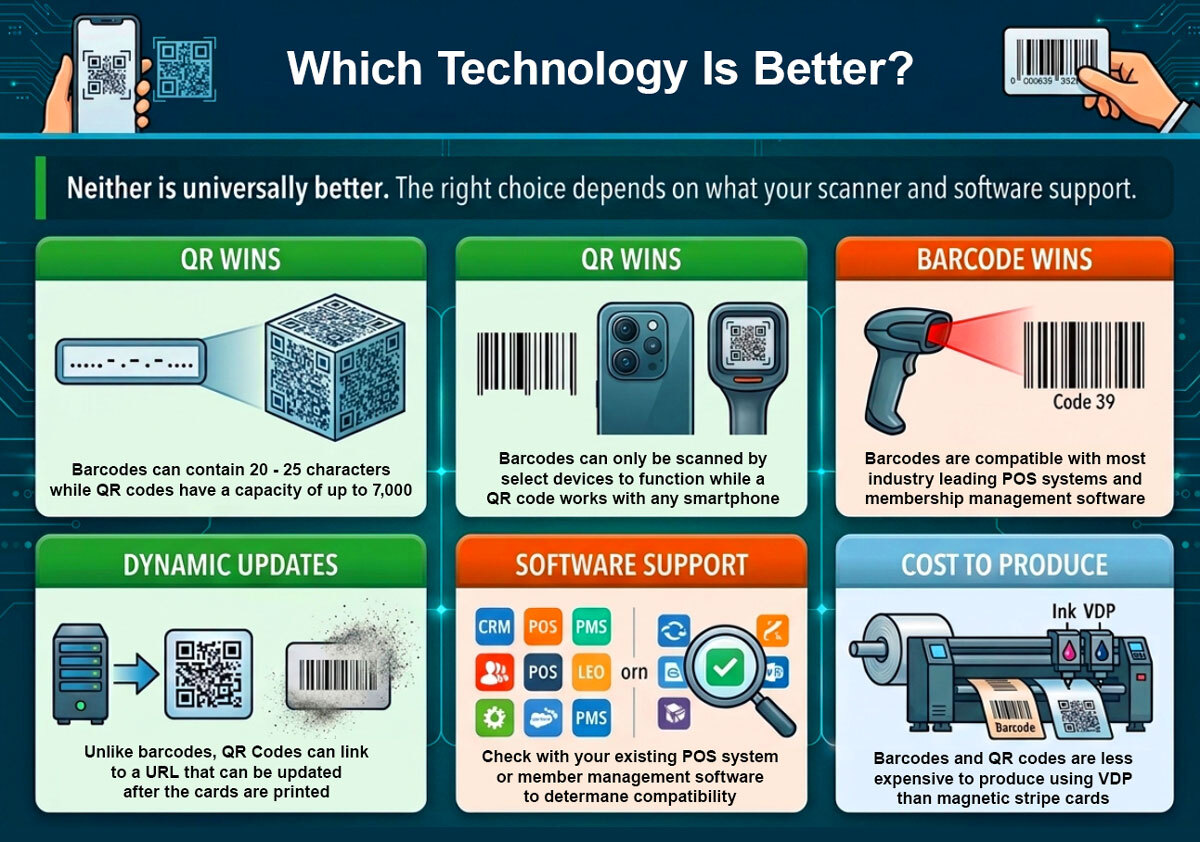
For most membership programs, a QR code is not inherently better than a barcode. It offers more flexibility, but that flexibility only matters if your setup can take advantage of it.
A standard 1D barcode works well when your check-in system uses a laser or CCD scanner at a staffed desk, your membership software likely already has barcode scan support, and the card does not need to link to a web resource or be scanned by a member's own phone. That covers the majority of gyms, libraries, associations, country clubs, and nonprofits.
A QR code is the better choice when members need to self-scan using their smartphones, when you want the card to link to a member portal or benefits page, or when dynamic redirect capability matters for updating the destination without reprinting cards. Museums, mobile-first programs, and organizations running newer, app-based check-in tend to benefit most.
The practical question: What does your existing scanner or check-in system support? A 1D laser scanner cannot read a QR code. A 2D scanner or a smartphone camera can read both. If your system already uses 2D scanning, QR offers additional capability at no extra cost. If you are running 1D scanners at the desk, a standard barcode is simpler and equally effective.
Both barcode and QR code work with variable data printing Each card in the batch gets its own unique code, whether that is a 1D barcode or a QR matrix.
What Are the Disadvantages of Magnetic Stripe Readers?
Magnetic stripe readers require the card to be physically swiped through a slot, with the stripe making contact with the read head. That physical contact creates several limitations that matter for membership programs.
- Stripe wear over time: repeated swiping gradually degrades the stripe surface. In high-frequency use programs, like a gym where a card is swiped hundreds of times, the stripe may become unreliable within a couple of years
- Magnetic interference: contact with a strong magnet can corrupt or erase the encoded data. Phone cases with magnetic closures, money clips, and proximity to other encoded cards are common culprits
- Reader wear: the read head in a magnetic stripe reader also wears with use and requires periodic cleaning or replacement, adding maintenance overhead
- Software compatibility: not all membership management platforms support magnetic stripe input. Unlike barcodes, which have near-universal support, magnetic stripe integration requires the platform to include a swipe reader module
These factors are why most membership programs default to barcode or RFID technology. The encoder cost, the stripe degradation risk, and the compatibility question are all friction points that do not exist with a printed barcode. Magnetic stripe still makes sense where a legacy POS system requires it, but for new program setups, barcode or RFID are almost always the more practical choices.
What Replaced Magnetic Stripe Cards?
In membership programs, barcodes replaced magnetic stripes for the vast majority of check-in setups. The shift was driven by three practical factors: barcode cards require no encoder at the production stage, barcode scanners are standard equipment in membership management systems, and the cost difference per card is meaningful at any order volume.
For access control specifically, where the goal is hands-free entry at a gate or turnstile rather than staffed desk check-in, RFID replaced magnetic stripes. An RFID card communicates without physical contact and without requiring the member to do anything beyond carrying the card and holding it near the reader. A magnetic stripe card needs to be physically swiped, which requires a deliberate action and a reader positioned for contact. At a car wash bay or gym turnstile handling hundreds of entries per day, that difference is operationally significant.
QR codes have filled the mobile-first gap that magnetic stripes never addressed. A QR code on a membership card can be scanned by a smartphone camera, linked to a member portal, or updated dynamically without reprinting. Magnetic stripe cards cannot do any of those things. For programs that integrate with mobile apps or want members to self-scan at entry, QR is where the format evolution has landed.
Magnetic stripes remain in use where legacy access control or check-in hardware was built around swipe readers and has not been updated. Hotel key card programs with older door locks continue to use the format because room lock hardware is standardized around it. For new membership program setups, though, there is rarely a reason to specify a magnetic stripe when barcode or RFID covers the same function with less complexity.
Which Encoding Should You Choose for Your Membership Cards?
Before looking at the table below, one step matters above everything else: check which encoding your membership management software supports. The best barcode format in the world does not help if your check-in platform only accepts magnetic swipe input, and vice versa. Contact your software provider or check the integration documentation before specifying encoding on your card order.
|
Program type |
Recommended |
Format |
Reason |
|
Gym or fitness center |
Barcode |
Code 128 |
Compatible with virtually all gym software and front desk scanners |
|
Library or university |
Barcode |
Code 128 or Code 39 |
Standard for catalog systems, works with existing scanner hardware |
|
Museum or cultural institution |
QR code |
Dynamic QR |
Self-scan at entry, links to member profile, smartphone friendly |
|
Nonprofit or association |
Barcode or plain printed |
Code 128 |
Simple, low cost, staffed desk check-in is sufficient |
|
Mobile-first or app-based program |
QR code |
Dynamic QR |
URL-based, updateable without reprinting cards |
|
Golf and country clubs |
Magnetic stripe, barcode, or RFID |
Check with POS |
Legacy POS integration; RFID preferred for new setups |
|
Car wash or automated gate |
RFID |
13.56 MHz |
Hands-free gate trigger, see RFID post |
|
Hotel or hospitality |
Magnetic stripe or RFID |
HiCo mag stripe |
Legacy POS integration; RFID preferred for new setups |
In access control environments like gates or automated entry systems, RFID membership cards have replaced magnetic stripes by allowing contactless interaction without requiring a swipe.
Encoding comparison at a glance
|
Factor |
Barcode (1D) |
QR Code (2D) |
Magnetic stripe |
|
Where data lives |
Database |
Database (static) or URL (dynamic) |
On the card stripe |
|
Reader required |
Laser or CCD scanner |
Scanner or smartphone camera |
Magnetic swipe reader |
|
Encoder required |
No |
No |
Yes, unless cad supplier encodes prior to shipping |
|
Cost (relative) |
Lowest |
Lowest |
Higher |
|
Data capacity |
20 to 25 characters |
Up to 7,000 characters |
~79 characters (Track 1) |
|
Damage risk |
Surface scratch |
Partial damage recoverable |
Magnetic interference or stripe wear |
|
Smartphone readable |
No |
Yes |
No |
|
Software compatibility |
Very high |
High |
Moderate, must confirm |
Multi-encoding: Barcode and QR code can be printed on the same card simultaneously. Barcode on the back for scanner check-in, QR below it for mobile self-service or web linking. Both are produced from the same data file through variable data printing in a single batch run.
In practice, the right choice depends on how your system operates, which is why understanding the different types of membership cards helps clarify which format fits your setup.
The Short Answer
If your membership card is just for show, you may not require a barcode, QR code, or magnetic stripe.
For membership programs that require their cards to function in some way, it really comes down to which option is compatible with your current access control, POS system, or member management platform.
A barcode is often the right call. It is cost-effective, requires the least hardware, and works with most membership management platforms. The first scan of a barcode on a commercial product happened in 1974. Half a century later, the format remains the most compatible and cost-effective encoding option for scan-based check-in programs.
QR codes are the better choice when smartphone scanning, dynamic URL linking, or mobile-first check-in is part of how the program operates. Magnetic stripes remain relevant only where legacy hardware requires them or where the program involves a POS system built around magnetic swipe input.
Confirm which format your membership software supports before ordering. That single check will make the rest of the decision straightforward.
Once you know which encoding works with your system, the next step is making sure the cards themselves are designed, printed, and encoded correctly so they actually perform at check in.
Most programs today use barcode or QR based systems because they are simpler, more compatible, and easier to maintain. The key is not just choosing the format, but making sure it works seamlessly with your existing software and check in process.
Looking for a turnkey system for printed membership cards with on-demand personalization and fulfillment services?
Print Robot is here to help you every step of the way!
Click here to get started with complimentary design services.